Part II: How to Configure OutlookExpress for Win95

Operating System: Win95
Application: Outlookexpress


  1. Click on the Servers tab.

Click on the Servers tab. Both mail servers are called: mailhost.bauercom.net;  account name is your username, all in
lowercase.

  1. Click on the Connection tab.
    Click on the Connection Tab. Select 'connect using my phone lines.'
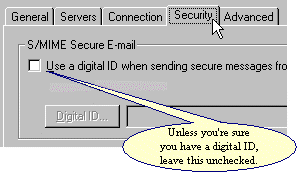
  2. Click on the Security tab.
    On the Security tab, make sure there is NOT a check next to use a digital ID.
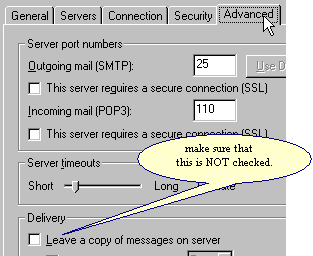
  3. Click on the Advanced tab.
    Make sure that there is NO check next to 'leave a copy of messages on server.'

Click OK. You're done!

Click here to return to the main Outlookexpress Page